Showing posts with label TSQL. Show all posts

10 May 2018

T-SQL Error: An aggregate may not appear in the set list of an update statement

A reporting project contains a table with the product summary, the table has a lot of KPIs and specifically the "Last Sale Date" of a product.
According to the company rules, a product is sold when it is paid.
The following T-SQL code (shown here very simplified) can be used to update that column:
UPDATE Product
SET LastSalesDate = MAX(Orders.PaymentDate)
FROM Product
    INNER JOIN Orders ON (Orders.ProductID = Product.ProductID)

After executing the statement in Sql Server the following error occurs:

Msg 157, Level 15, State 1, Line 2
An aggregate may not appear in the set list of an UPDATE statement.


The error indicates that a column of a table is being updated applying an aggregate function directly.
The solution is to rewrite the query, using for example a sub-query.
Example:

UPDATE Product
SET LastSalesDate = LastSaleDates.PaymentDate
FROM Product
    INNER JOIN 
    (
        SELECT MAX(Orders.PaymentDate) AS PaymentDate
            ,Orders.ProductID
        FROM Orders
        GROUP BY Orders.ProductID
    ) LastSaleDates ON (LastSaleDates.ProductID = Product.ProductID)


Another possible solution is to use a Common Table Expression (CTE).
;WITH [LastSaleDates] AS
(
    SELECT MAX(Orders.PaymentDate) AS PaymentDate
            ,Orders.ProductID
    FROM Orders
    GROUP BY Orders.ProductID 
)

UPDATE Product
SET LastSalesDate = LastSaleDates.PaymentDate
FROM Product
    INNER JOIN LastSaleDates ON (LastSaleDates.ProductID = Product.ProductID)

27 April 2018

How to start SQL Agent job from Another server

A common scenario, when managing a server farm, is to have to sync the SQL Agent jobs in several servers.

You may want to start a job on a second server (SQL02) when a job completes on a primary server (SQL01).

The SQL02 may be a reporting or staging sever, and the SQL01 may be the transnational server.

Sql Server has a T-SQL statement - sp_start_job - to start a job on the server where it is executed.

From the Microsoft Documentation, sp_start_job has the following parameters:

sp_start_job
{[@job_name =] 'job_name' | [@job_id =] job_id }
[ , [@error_flag =] error_flag]
[ , [@server_name =] 'server_name']
[ , [@step_name =] 'step_name']
[ , [@output_flag =] output_flag]


The @server_name parameter is relative to the server where it is executed.
If the parameter supported executing a job from another server it would be great, but no such luck!!!v

The solution is to set a SQL02 as a linked server, this allow that Sql would recognize the remote server as being local.

To configure a linked server on Sql 2014 (It may change from Sql Sever version to Sql Sever Version), follow the next steps:
1) Open Sql Server Management Studio (SSMS)
2) Expand the SQL01 node name
3) Expand "Server Objects"
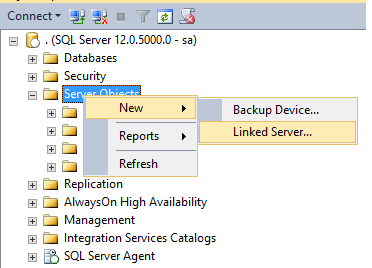
4) Press the right mouse button on the ""Server Objects"
Example:


5) Write the Linked Server Name: SQL02 in this example
6) Set the server type to SQL Server
7) In Security set the your security settings
In this example the Local login is "sa" and the "Impersonate" checkbox is active. Also the "For a login not defined in the list above, connection will:" option is set to "Be made using this security context", defining the Remote login and password.
Example:


8) On "Server Options" allow "RPC Out"
Example:


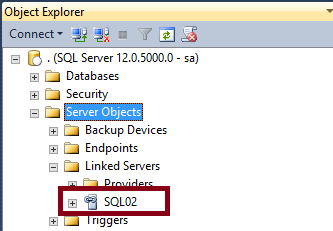
9) Press OK and if the everithing is correctly defined the linked server is configured


After configuring the linked server the job can be started on the SQL02 from the SQL01.

To test open a query window on SSMS in the SQL01 server and execute the SP to start the job:

EXEC [SQL02].[msdb].[dbo].[sp_start_job] @job_name = N'MyJob';

Where "MyJob" is the name of the job to start on SQL02

Note that the job is started, but the sp_start_job does not wait for the job "MyJob" to complete the execution.

19 June 2017

T-SQL: How to raise an error on a user defined function (udf)

A common programming task is to create a user-defined function. The function can perform some tasks and raise an error if some validation fails.
Let us try to raise an error
CREATE FUNCTION dbo.Division(@op1 INT, @op2 INT)
RETURNS INT
AS
BEGIN
    IF (@op2 = 0)
    BEGIN
    RAISERROR ('Division by zero.', 16, 1);
    END

    RETURN CAST(@op1 AS DECIMAL(18, 8)) /@op2
END

But this approach gives the following error:

Msg 443, Level 16, State 14, Procedure Division, Line 7 [Batch Start Line 0]
Invalid use of a side-effecting operator 'RAISERROR' within a function.

So another approach is needed.
Let us try the THROW statement
CREATE FUNCTION dbo.Division(@op1 INT, @op2 INT)
RETURNS INT
AS
BEGIN
    IF (@op2 = 0)
    BEGIN
    ;THROW 51000, 'Division by zero.',1;
    END

    RETURN CAST(@op1 AS DECIMAL(18, 8)) /@op2
END

But the result is the same as the RAISERROR:

Msg 443, Level 16, State 14, Procedure Division, Line 7 [Batch Start Line 0]
Invalid use of a side-effecting operator 'THROW' within a function.

Having tried all the known solutions to throw an exception in Sql Server, an alternative is needed.
Let's try a cast conversion error:
CREATE FUNCTION dbo.Division(@op1 INT, @op2 INT)
RETURNS DECIMAL(18, 8)
AS
BEGIN
    IF (@op2 = 0)
    BEGIN
    RETURN CAST('Division by zero.' AS INT);
    END

    RETURN CAST(@op1 AS DECIMAL(18, 8)) /  CAST(@op2 AS DECIMAL(18, 8))
END

The function is now created with success.
Let us see the result of calling the function with a division by zero:
SELECT dbo.Division(1, 0)

The following exception is thrown:

Msg 245, Level 16, State 1, Line 14
Conversion failed when converting the varchar value 'Division by zero.' to data type int.


It's not the ideal solution, but it allows us to generate a exception on a T-SQL function.

20 February 2017

How to backup all the user databases

The database administrator must backup periodically the databases on the Sql Servers.

The process is tedious and must be automated with a script to avoid forgetting any database.


The simple script can be scheduled on the Sql Server agent.
DECLARE @backupName VARCHAR(255) -- database backup name  
DECLARE @databaseName VARCHAR(255) -- database name  
DECLARE @path VARCHAR(256) -- Folder for the for backup files  
DECLARE @fileName VARCHAR(256) -- file name for generating the backup  
DECLARE @databaseExclusions TABLE (DatabaseName VARCHAR(255)) -- Databases to exclude the backup

-- Input parameters
SET @path = 'D:\Backup\2\'  
INSERT INTO @databaseExclusions (DatabaseName)
VALUES
('tempdb'),('master'),('model'),('msdb'),('AdventureWorks')


DECLARE database_cursor CURSOR FOR  
SELECT top 5 name
    FROM sys.databases 
    WHERE [state] <> 6 -- OFFLINE
    AND owner_sid != 1 -- User user database
    AND name NOT IN (SELECT DatabaseName FROM @databaseExclusions)
 
OPEN database_cursor   
FETCH NEXT FROM database_cursor INTO @databaseName   
 
WHILE @@FETCH_STATUS = 0   
BEGIN   
   SET @fileName = @path + @databaseName;  
   SET @backupName = @databaseName + '-Full Database Backup';

   BACKUP DATABASE @databaseName TO DISK = @fileName WITH NOFORMAT, INIT,  NAME = @backupName, SKIP, NOREWIND, NOUNLOAD, COMPRESSION,  STATS = 10
   
   FETCH NEXT FROM database_cursor INTO @databaseName   
END   

 
CLOSE database_cursor   
DEALLOCATE database_cursor

01 June 2016

T-SQL: How to split a path name in the path and file name

A common task in T-SQL is how to split a path name in the path and file name.

The following code will do the task:

DECLARE @file VARCHAR(200) = 'c:\temp\data\log.txt'

SELECT REVERSE(LEFT(REVERSE(@file), CHARINDEX('\', REVERSE(@file), 1) - 1)) AS [FileName]

SELECT LEFT(@file, LEN(@file) - CHARINDEX('\', REVERSE(@file), 1) + 1) AS [Path]

07 April 2016

Error when creating a Database diagram: Database owner is invalid

After restoring a database, I got an error when creating a Database diagram. Like the following image:


The error informs that the database owner is invalid.

The solution is to change to database owner using the sp_changedbowner.

To change the database owner for the sa user:
EXEC sp_changedbowner 'sa'

04 April 2016

The mistery of the slow stored procedure in the web App and fast in SSMS

Sql Server has a lot of mysteries and hidden "features".

In the troubleshooting of a web application page response time, I got a timeout executing a Stored Procedure. The query took more than 30 seconds executing on the SQL Server profiler.

I captured the query and executed it in SQL Server Management Studio (SSMS), to start analyzing the query execution plan.
For my surprise it was super-fast when executed in SSMS.

After some research I found that the applications the use ADO.Net set the ARITHABORT to OFF and SSMS set it to ON.
The setting can be disable as shown the in following image.

This setting difference makes that the SSMS will not reuse the same cache entry that the ADO.Net application uses. SQL Server will compile the stored procedure and create a new execution plan.
There are also other possibilities like parameter sniffing to cause this difference on execution times.
In my case the parameters were the same, but what only changed was the ARITHABORT setting.

Having identified that the problem was with the Stored Procedure corrupted execution plan and it's cache, I simply forced a recompile of the stored procedure using the WITH RECOMPILE.
Example usage:

ALTER PROCEDURE myStoredProcedure
(
@id INT,
@date DATETIME
)
WITH RECOMPILE
AS


SQL Server recompiled the stored procedure, generated a new plan and the timeout disappeared.

26 February 2016

T-SQL: Converting rows to columns

A common task of a database developer is to convert rows to columns from a query result set.

T-SQL has the PIVOT that facilitates the process.

A simple example:

DECLARE @myValues TABLE (Quantity INT, Category VARCHAR(100))

INSERT INTO @myValues (Quantity, Category)
VALUES 
 (10, 'Fruits'),
 (200, 'Vegetables'),
 (40, 'Meats')


SELECT *
FROM @myValues

SELECT [Fruits], [Vegetables], [Meats]
FROM @myValues
PIVOT
(
  MAX(Quantity)
  FOR Category IN ([Fruits], [Vegetables], [Meats])
) Piv

07 February 2013

Query Optimization and the SQL Server Cache

Query optimization is a very important task to assure that the server resources are not heavily consumed by a bad performing query.
One of the important tasks when optimizing a query  is to clean the SQL Server Cache so that the results are not influenced by the caching mechanism.

The T-SQL commands, that clean the Sql Server cache, will cause severe performance problems in a production environment, so they are to be used for testing purposes on a development or staging environment only.
They can be executed in a production server in special and controlled conditions. An example is to remove an individual plan of a query that has a bad performance because of a bad plan cache.

This article explains the main concepts involved and then the possible options to Clean the Sql Server Cache.


Execution Plan

The execution plan is the result of the query optimizer attempt to calculate the most efficient way to process the request represented by the SQL query statement.
Sql Server has to build an execution plan for each Transact-SQL (T-SQL) statement it has to execute.
The  execution plan defines how the T-SQL statement can be executed by Sql Server to produce the desired results.

The execution plan is built based on several considerations:
1) The tables it needes to join
2) The Indexes to use 
3) The sub-queries it has to execute
4) How aggregations of Group By are calculated
5) The estimated cost and load the operations place on the system
6) other even more complex considerations

The execution plan is also known as query plan.

As can be easily understandable, SQL has to put a lot of work to build a Execution Plan, so it caches the execution plan in memory to avoid having to do the same work over and over again.
Sql Server uses the Plan Cache to reuse plans. In this way, SQL Server can avoid the overhead of calculating the execution plan for each T-SQL statement and in this way speed up the execution of the queries.

 
Plan Cache

The plan cache is used by Sql Server to store the Execution Plans of the queries it has run.
The plan cache allows Sql Server to reuse Execution Plans for subsequent requests. It stores plans and it's associated information. There are metrics about the number of times a query was executed and the resources it used for example.

The Plan cache can be flush totally in some situations, the principal are:
1) Sql Server Service Restarts
2) Statistics of an object changing
3) Restores of a database
4) Executing T-SQL commands to clean it
5) Insufficient Memory on the server, causing memory pressure
6) Detaching a database
7) Some T-SQL Commands like for example RECONFIGURE, ALTER DATABASE ... MODIFY FILEGROUP or modifying a collation using ALTER DATABASE … COLLATE command

 The Plan cache of a database can also be flushed totally in some situations, where the principal are:
1) Some operations like for example DROP DATABASE or ALTER DATABASE … MODIFY NAME
2) If the database auto-closes
3) The database is set online or offline


Recompilations

Sql Server checks for correctness and for the optimality of a query plan before it executes it.
If one of the checks fails, the statement is compiled again and new query plan is produced.
These compilations are named as recompilations.

The recompilations are necessary to:
1)  Ensure statement correctness
2)  Obtain potentially better query execution plans as data changes

The recompilations can also have the side effect that they can slow down executions considerably.
In this case it is necessary to reduce the number of recompilations.

Parameter sniffing

Parameter sniffing is a complex topic, but according to Microsoft:

"Parameter sniffing" refers to a process whereby SQL Server's execution environment "sniffs" the current parameter values during compilation or recompilation, and passes it along to the query optimizer so that they can be used to generate potentially faster query execution plans. The word "current" refers to the parameter values present in the statement call that caused a compilation or a recompilation.

The query optimizer uses the parameters passed to the statements for performing estimates  when evaluating possible execution plan options. The final effect is that the plan is optimized for those specific parameter values. 
This feature allows more efficient stored procedure execution plans in most cases. There is however an assumption that the parameter values are "typical".
The main problem with this approach is when a parameter is atypical. The asymmetry usually is in the distribution of the data values or how the value is distributed across where the data is a non-uniform distribution, this is called skewed data.
 One example of skewed data is when there is a table with two million records and a column of type BIT. That column has the value 0 for only 1000 records and all the others have the value 0.
The LIKE clause is also very prune to this issue.

Parameter sniffing affects the performance of a query since the execution plan that is generated by the query optimizer depends on parameter sniffing.

Parameter values are sniffed for:
1) Stored Procedures
2) Queries executed using sp_executesql
3) Prepared queries

The following statements help to control the parameter sniffing performance problems:
1) WITH RECOMPILE - the stored procedure
2) Dummy local variables that are set equal to a parameter
3) OPTION(RECOMPILE) - This query hint is used to extended the behavior to queries (SELECT, INSERT, UPDATE, or DELETE). In this case,  both the parameter values and the current values of local variables are sniffed.
4) OPTION(OPTIMIZE FOR ())

The explanation of these options are out of the scope of this article, but you can search for a detailed explanation if you wish to learn more.


Clean the buffers

Sql Sever buffers the data before it is written to disk, this can cause dirty pages.
To guarantee that all these dirty pages, for the current database, are be written to disk and buffers are clean use the CHECKPOINT statement.
CHECKPOINT forces all dirty pages for the current database to be written to disk and cleans the buffers. After you do this, you can issue DBCC DROPCLEANBUFFERS command to remove all buffers from the buffer pool.

The CHECKPOINT is to guarantee that if you performed an operation or if you are in a collaborative environment that you are also testing you don't end up with dirty pages in the buffers.

Use DBCC DROPCLEANBUFFERS to test queries with a cold buffer cache without shutting down and restarting the server.  It serves to empty the data cache. Any data loaded into the buffer cache due to the prior execution of a query is removed.

Example:
CHECKPOINT
GO
DBCC DROPCLEANBUFFERS
GO


Clean the Plan Cache

There are several options to clean the plan cache. The next sections are going to explain the principal options, but don't forget to always Clean the Buffers first.


Clean the entire Plan Cache

The more drastic method is to clean the entire Sql Server plan cache, using the statement FREEPROCCACHE.
This will free the entire plan cache and causes the recompilation of subsequent ad-hoc SQL statements or Stored Procedures.

Usage:
DBCC FREEPROCCACHE


Clean a Database Plan Cache

A less drastic option, is to clear only the entire plan cache for a specific database and not the full Sql Server Plan Cache.

Usage:
DECLARE @dbId INTEGER
SELECT @dbId  = dbid FROM master.dbo.sysdatabases WHERE name = ‘myDatabase’
DBCC FLUSHPROCINDB (@dbId)

Where myDatabase is database to clear the entire plan cache.
The @dbId parameter is the database the number (database ID) to be affected by the FLUSHPROCINDB  command.


Clean a Compiled Plan

In some situations it is useful to clean only a specific compiled execution plan for an Stored Procedure or a Ad-Hoc query.
One example is when some queries are executed in production for testing or to Extract, Transform, Load (ETL) data and should be removed form the Plan Cache so that they don't occupy cache space.

Usage:
SELECT [text], CachedPlans.size_in_bytes, CachedPlans.plan_handle, CachedPlans.objtype, CachedPlans.usecounts
FROM sys.dm_exec_cached_plans AS CachedPlans
CROSS APPLY sys.dm_exec_sql_text(plan_handle)
WHERE CachedPlans.cacheobjtype = N'Compiled Plan'

This query returns all the compiled plans.
The column Text identifies the T-SQL statement executed (Stored Procedure: proc or Ad-Hoc Query: Adhoc for example) and  the plan_handle can be passed to FREEPROCCACHE to remove it:

DBCC FREEPROCCACHE (plan_handle)


Clean  Stored procedure or Trigger Plan cache

The sp_recompile statement causes the recompilation of stored procedures and triggers the next time that they are run.It drops the existing plan from the procedure cache.

Usage:
EXEC sp_recompile N'myObject'';

Where myObject can be a stored procedure, trigger, table, or view in the current database.
If is the name of a stored procedure or trigger, the stored procedure or trigger will be recompiled the next time that it is executed.
If object is the name of a table or view, all the stored procedures or triggers that reference the table or view will be recompiled the next time that they are executed.

13 December 2011

How to Convert rows to CSV in T-SQL

To convert several rows to unique row in CSV using T-SQL, use the following code:
 
DECLARE @myList varchar(MAX)
SELECT @myList = coalesce(@myList + ',', '') + UserName 
FROM [User]

SELECT @myList

05 December 2011

Recover the mirror database

Database mirroring is a software solution for increasing database availability.
Database mirroring maintains two copies of a single database that must reside on different server instances of SQL Server Database Engine.
When the mirror is removed from the Primary database the mirrored one sometimes doesn't recover and it says "Recovering".
If the database doesn't leave this state, the following TSQL command can help:

RESTORE DATABASE myDatabase WITH RECOVERY
 
This will allow to recover the former mirror database.


10 November 2011

Transaction management

In the context of a transaction each work-unit performed in a database must either complete in its entirety or rollback entirely.
In SQL Server an "normal" exception does not rollback a transaction by default.

In the old days the T-SQL  to manage a transaction was tedious.
An error variable must be checked to rollback the transaction if needed.
 Example:
BEGIN TRANSACTION 

...
IF (@@ERROR <> 0)
BEGIN
   ROLLBACK TRANSACTION 
    RAISERROR ('Error Description.', 16, 1)
END

COMMIT TRANSACTION


But the newer versions of SQL Server support TRY CATCH block, that simplifies the process:
BEGIN TRY
BEGIN TRANSACTION

...

IF @@TRANCOUNT > 0
BEGIN
    COMMIT TRANSACTION
END

END TRY
BEGIN CATCH

 DECLARE @ErrorMessage VARCHAR(4000)
  
 SET @ErrorMessage = 'Procedure: ' + ISNULL(ERROR_PROCEDURE(), '') + ' Line: ' + 
CAST(ERROR_LINE() AS VARCHAR(10)) + ' Message: ' + ERROR_MESSAGE()
  
 IF @@TRANCOUNT > 0
 BEGIN
  ROLLBACK TRANSACTION;
 END
  
 RAISERROR (@ErrorMessage, 16, 1)  

END CATCH;

Another way of doing the same is using SET XACT_ABORT. I don't recommend using it, but in some temporary scripts it can be useful.

The SET XACT_ABORT specifies whether SQL Server automatically rolls back the current transaction when a statement raises a run-time error.

SET XACT_ABORT ON
BEGIN TRANSACTION

....

COMMIT TRANSACTION


Note also that the RAISERROR stament does not honor the XACT_ABORT setting, so if an error occurs there is no automatic rollback even if XACT_ABORT is ON.

Sql Server 2012 implements the THROW statement that is suggested by Microsoft to be used instead of the RAISERROR.
The main difference is that the THROW:
1) Can re-throw the original exception that is caught in the CATCH block.
2) Causes the statement batch to be ended and the next statements aren't executed.
3) There is no severity parameter.The exception severity is always set to 16.
4) Requires preceding statement to end with semicolon (;).
5) Default THROW statement will show the exact line where the exception was occurred


A simple usage example:
BEGIN TRY
BEGIN TRANSACTION

...

IF @@TRANCOUNT > 0
BEGIN
    COMMIT TRANSACTION
END

END TRY
BEGIN CATCH 
 IF @@TRANCOUNT > 0
 BEGIN
  ROLLBACK TRANSACTION;
 END;
  
  THROW  

END CATCH;


Note that Microsoft states that: "The THROW statement honors SET XACT_ABORT RAISERROR does not. New Applications should use THROW instead of RAISERROR."

The THROW syntax is:
THROW [error number] [message] [state]

The two first parameters are self explanatory.
The state parameter is a constant or variable between 0 and 255 that indicates the state to associate with the message.

12 April 2011

How to set a date to the first / last day in TSQL

To set a date to the first / last day in TSQL:

First day:
SELECT DATEADD(mm, DATEDIFF(mm, 0, GETDATE()) + 1, 0)
Last Day :
SELECT DATEADD(dd, -1, DATEADD(mm, DATEDIFF(mm, 0, GETDATE()) + 1, 0))

11 April 2011

How to convert a table column in comma separated values (CSV)

To convert a table column in comma separated values (CSV), I use the following snippet:


DECLARE @table TABLE
(
    Id INT
)

INSERT INTO @table
VALUES (1),(5),(88), (99)

SELECT SUBSTRING(
(
SELECT ',' + CAST(Id AS VARCHAR(200))
FROM @table 
FOR XML PATH('')
)
,2,2000) AS VAL

12 October 2010

Get only the Date Part of a DateTime

To get only the Date Part of a DateTime in an efficient way, use the following code:


SELECT CAST(FLOOR( CAST( GETDATE() AS FLOAT )) AS DATETIME)

20 August 2010

How to change the identity value of a table

To change the identity value of a table use the statement:

DBCC CHECKIDENT (myTable, reseed, value)


Where
- myTable is the table to change the identity value
- reseed specifies that the identity value should be changed
- value is the new value to use for the identity column

Example:
DBCC CHECKIDENT (Products, reseed, 12)

After this command executed, the next identity value of the Products table will be 13

This command is useful if you delete records at the end of a table and want to keep the identity values sequential.

12 March 2009

How to delete a temporary table in TSQL

When a TSQL script creates a temporary table, it is useful in developing mode to drop the table if it exists.

The following script does the job:

IF OBJECT_ID( N'tempdb..#MyTempTable') IS NOT NULL
DROP TABLE #MyTempTable

How to: Restore a SQL Server database with TSQL

The task of restoring a SQL Server database with a TSQL script is as simple as executing the following script:

RESTORE DATABASE [MyDatabase]
FROM DISK = N'C:\Backup\MyDatabase.bak'
WITH  FILE = 1,
MOVE N'MyDataLogicalName' TO N'D:\DatabasesData\MyDatabase.mdf', 
MOVE N'MyLogLogicalName' TO N'D:\DatabasesLog\MyDatabase_log.ldf', 

The only problem with the previous script is that if there are any open connections to the database the following error is generated:


Exclusive access could not be obtained because the database is in use.


To fix the issue one solution is to put the database in single user mode before the backup.

-- Put the database in single user Mode
ALTER DATABASE MyDatabase
SET SINGLE_USER WITH
ROLLBACK IMMEDIATE
-- Restore the Database
RESTORE DATABASE MyDatabase FROM DISK ...
-- Put the database back in multiuser mode
ALTER DATABASE MyDatabase SET MULTI_USER
GO

If this script fails, execute the last statement to put the data base back in multiuser mode.

To simply restore the database use:
-- Put the database in single user Mode
ALTER DATABASE MyDatabase
SET SINGLE_USER WITH
ROLLBACK IMMEDIATE
-- Restore the Database
RESTORE DATABASE MyDatabase FROM DISK = N'C:\Backup\MyDatabase .bak' WITH FILE = 1, NOUNLOAD, REPLACE, STATS = 10
-- Put the database back in multiuser mode
ALTER DATABASE MyDatabase SET MULTI_USER
GO

16 January 2009

How To: Change the tempdb data files location

To change the tempdb data files location:
1) Determine the logical file names for the tempdb database.
The logical name for each file is contained in the NAME column.

USE tempdb
GO
EXEC sp_helpfile

2)Change the location of each file using ALTER DATABASE.
USE master
GO
ALTER DATABASE tempdb MODIFY FILE (NAME = tempdev, FILENAME = 'E:\DBData\tempdb.mdf')
GO
ALTER DATABASE tempdb MODIFY FILE (NAME = templog,FILENAME = 'E:\DBData\templog.ldf')
GO
3) Stop and restart SQL Server.

07 January 2009

How To: Drop a user that owns a schema

SQL Server returns the error

The database principal owns a schema in the database, and cannot be dropped

when a user is being dropped that owns a schema in the database.

The delete the user go to Sql Server Management Studio, expand your database -> Security and press on Schemas. In the Object Explorer Details (if not visible go to the View Menu e select Object Explorer Details) you can see a list of the schemas and the owners.

Now locate the schema(s) the user you want to delete is the owner, right click and select properties. In the General you can see the schema owner, change it to the new owner (dbo for example).

When the user you want to delete has no schemas owned you can delete it.