Showing posts with label SQL Server. Show all posts

10 May 2018

T-SQL Error: An aggregate may not appear in the set list of an update statement

A reporting project contains a table with the product summary, the table has a lot of KPIs and specifically the "Last Sale Date" of a product.
According to the company rules, a product is sold when it is paid.
The following T-SQL code (shown here very simplified) can be used to update that column:
UPDATE Product
SET LastSalesDate = MAX(Orders.PaymentDate)
FROM Product
    INNER JOIN Orders ON (Orders.ProductID = Product.ProductID)

After executing the statement in Sql Server the following error occurs:

Msg 157, Level 15, State 1, Line 2
An aggregate may not appear in the set list of an UPDATE statement.


The error indicates that a column of a table is being updated applying an aggregate function directly.
The solution is to rewrite the query, using for example a sub-query.
Example:

UPDATE Product
SET LastSalesDate = LastSaleDates.PaymentDate
FROM Product
    INNER JOIN 
    (
        SELECT MAX(Orders.PaymentDate) AS PaymentDate
            ,Orders.ProductID
        FROM Orders
        GROUP BY Orders.ProductID
    ) LastSaleDates ON (LastSaleDates.ProductID = Product.ProductID)


Another possible solution is to use a Common Table Expression (CTE).
;WITH [LastSaleDates] AS
(
    SELECT MAX(Orders.PaymentDate) AS PaymentDate
            ,Orders.ProductID
    FROM Orders
    GROUP BY Orders.ProductID 
)

UPDATE Product
SET LastSalesDate = LastSaleDates.PaymentDate
FROM Product
    INNER JOIN LastSaleDates ON (LastSaleDates.ProductID = Product.ProductID)

27 April 2018

How to start SQL Agent job from Another server

A common scenario, when managing a server farm, is to have to sync the SQL Agent jobs in several servers.

You may want to start a job on a second server (SQL02) when a job completes on a primary server (SQL01).

The SQL02 may be a reporting or staging sever, and the SQL01 may be the transnational server.

Sql Server has a T-SQL statement - sp_start_job - to start a job on the server where it is executed.

From the Microsoft Documentation, sp_start_job has the following parameters:

sp_start_job
{[@job_name =] 'job_name' | [@job_id =] job_id }
[ , [@error_flag =] error_flag]
[ , [@server_name =] 'server_name']
[ , [@step_name =] 'step_name']
[ , [@output_flag =] output_flag]


The @server_name parameter is relative to the server where it is executed.
If the parameter supported executing a job from another server it would be great, but no such luck!!!v

The solution is to set a SQL02 as a linked server, this allow that Sql would recognize the remote server as being local.

To configure a linked server on Sql 2014 (It may change from Sql Sever version to Sql Sever Version), follow the next steps:
1) Open Sql Server Management Studio (SSMS)
2) Expand the SQL01 node name
3) Expand "Server Objects"
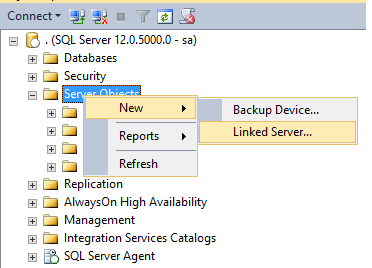
4) Press the right mouse button on the ""Server Objects"
Example:


5) Write the Linked Server Name: SQL02 in this example
6) Set the server type to SQL Server
7) In Security set the your security settings
In this example the Local login is "sa" and the "Impersonate" checkbox is active. Also the "For a login not defined in the list above, connection will:" option is set to "Be made using this security context", defining the Remote login and password.
Example:


8) On "Server Options" allow "RPC Out"
Example:


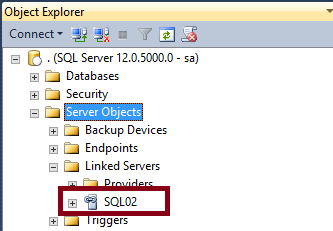
9) Press OK and if the everithing is correctly defined the linked server is configured


After configuring the linked server the job can be started on the SQL02 from the SQL01.

To test open a query window on SSMS in the SQL01 server and execute the SP to start the job:

EXEC [SQL02].[msdb].[dbo].[sp_start_job] @job_name = N'MyJob';

Where "MyJob" is the name of the job to start on SQL02

Note that the job is started, but the sp_start_job does not wait for the job "MyJob" to complete the execution.

20 February 2017

How to backup all the user databases

The database administrator must backup periodically the databases on the Sql Servers.

The process is tedious and must be automated with a script to avoid forgetting any database.


The simple script can be scheduled on the Sql Server agent.
DECLARE @backupName VARCHAR(255) -- database backup name  
DECLARE @databaseName VARCHAR(255) -- database name  
DECLARE @path VARCHAR(256) -- Folder for the for backup files  
DECLARE @fileName VARCHAR(256) -- file name for generating the backup  
DECLARE @databaseExclusions TABLE (DatabaseName VARCHAR(255)) -- Databases to exclude the backup

-- Input parameters
SET @path = 'D:\Backup\2\'  
INSERT INTO @databaseExclusions (DatabaseName)
VALUES
('tempdb'),('master'),('model'),('msdb'),('AdventureWorks')


DECLARE database_cursor CURSOR FOR  
SELECT top 5 name
    FROM sys.databases 
    WHERE [state] <> 6 -- OFFLINE
    AND owner_sid != 1 -- User user database
    AND name NOT IN (SELECT DatabaseName FROM @databaseExclusions)
 
OPEN database_cursor   
FETCH NEXT FROM database_cursor INTO @databaseName   
 
WHILE @@FETCH_STATUS = 0   
BEGIN   
   SET @fileName = @path + @databaseName;  
   SET @backupName = @databaseName + '-Full Database Backup';

   BACKUP DATABASE @databaseName TO DISK = @fileName WITH NOFORMAT, INIT,  NAME = @backupName, SKIP, NOREWIND, NOUNLOAD, COMPRESSION,  STATS = 10
   
   FETCH NEXT FROM database_cursor INTO @databaseName   
END   

 
CLOSE database_cursor   
DEALLOCATE database_cursor

02 June 2014

Undocumented sp_MSforeachdb: Iterate through each database

The stored procedure sp_MSforeachdb is used to iterate through each database that exists in SQL Server, including the system databases.

The stored procedure is undocumented and can be removed at any time, so use it carefully.

It is used to run a command over a set of databases in a server.
The stored procedure receives a parameter with the command to execute. The ? is used as a placeholder to identify the current database name listed by the stored procedure.

Some common scenarios where it can be used are:

1. Print all the database names, excluding the master,tempdb, model and msdb:
EXEC sp_msforeachdb 
"IF '?' NOT IN ('master','tempdb', 'model', 'msdb')   
BEGIN
        PRINT '?'
END"


2. Show the size of all the database
EXEC sp_MSforeachdb 'USE ?; EXEC sp_spaceused'


3. Check the integrity of all objects in the database
sp_MSforeachdb 'DBCC CHECKDB(?)' 


4. Retrieve database physical files information excluding the master,tempdb, model and msdb:
EXEC sp_msforeachdb 
'IF ''?'' NOT IN (''master'',''tempdb'', ''model'', ''msdb'')   
BEGIN
        SELECT name,physical_name,state,size FROM [?].sys.database_files
END'


5. Retrieve database physical files information excluding the master,tempdb, model and msdb to a table:

DECLARE @DbSize TABLE
    (
      mame NVARCHAR(50),
      physical_name NVARCHAR(500),
      size INT,
      growth INT,
   is_percent_growth BIT,
   type_desc NVARCHAR(10)
    )

INSERT  INTO @DbSize
EXEC sp_MSforeachdb 'IF ''?''  NOT IN (''master'', ''tempDB'',''model'',''msdb'')
BEGIN
       SELECT name,physical_name,size, growth, is_percent_growth, type_desc
       FROM ?.sys.database_files
END'

SELECT * FROM @DbSize

13 December 2011

How to Convert rows to CSV in T-SQL

To convert several rows to unique row in CSV using T-SQL, use the following code:
 
DECLARE @myList varchar(MAX)
SELECT @myList = coalesce(@myList + ',', '') + UserName 
FROM [User]

SELECT @myList

12 October 2010

Get only the Date Part of a DateTime

To get only the Date Part of a DateTime in an efficient way, use the following code:


SELECT CAST(FLOOR( CAST( GETDATE() AS FLOAT )) AS DATETIME)

20 August 2010

How to change the identity value of a table

To change the identity value of a table use the statement:

DBCC CHECKIDENT (myTable, reseed, value)


Where
- myTable is the table to change the identity value
- reseed specifies that the identity value should be changed
- value is the new value to use for the identity column

Example:
DBCC CHECKIDENT (Products, reseed, 12)

After this command executed, the next identity value of the Products table will be 13

This command is useful if you delete records at the end of a table and want to keep the identity values sequential.

23 April 2010

Get only the date part of a DATETIME

To get only the date part of a DATETIME on an efficient manner use the following code:


CAST(FLOOR( CAST( GETDATE() AS FLOAT )) AS DATETIME)

15 April 2010

Fastest Storage for SQL Server please

A SQL Server database server with large data files, low main memory and slow data storage (disks) can compromise the performance of an application.
The solution is to add more main memory or get a fastest storage. If the data files are too large then the fastest storage is the only option.
There are solutions that really can do miracles...but at a price.
One of those solutions is the RamSan-440.
The main specifications are:

- 256GB or 512GB DDR RAM primary storage backed up by fast flash secondary storage
- Over 600,000 random I/Os per second
- 4500 MB/s random sustained external throughput
- Full array of hardware redundancy to ensure availability
- Exclusive Active Backup® software constantly backs up data without any performance degradation. Other SSDs only begin to backup data after power is lost.
- Patented IO2 (Instant-On Input Output) software allows data to be accessed during a recovery. Customers no longer have to wait for a restore to be completed before accessing their data.

With this hardware the problems are over...but when you talk to a CEO or an Administrator about the solution and the price, in most of the situations he doesn't mid to wait!!! :))

For more information press here.

You can also take a look at The Fastest Solid State Disks (SSDs)

12 March 2009

How to delete a temporary table in TSQL

When a TSQL script creates a temporary table, it is useful in developing mode to drop the table if it exists.

The following script does the job:

IF OBJECT_ID( N'tempdb..#MyTempTable') IS NOT NULL
DROP TABLE #MyTempTable

How to: Restore a SQL Server database with TSQL

The task of restoring a SQL Server database with a TSQL script is as simple as executing the following script:

RESTORE DATABASE [MyDatabase]
FROM DISK = N'C:\Backup\MyDatabase.bak'
WITH  FILE = 1,
MOVE N'MyDataLogicalName' TO N'D:\DatabasesData\MyDatabase.mdf', 
MOVE N'MyLogLogicalName' TO N'D:\DatabasesLog\MyDatabase_log.ldf', 

The only problem with the previous script is that if there are any open connections to the database the following error is generated:


Exclusive access could not be obtained because the database is in use.


To fix the issue one solution is to put the database in single user mode before the backup.

-- Put the database in single user Mode
ALTER DATABASE MyDatabase
SET SINGLE_USER WITH
ROLLBACK IMMEDIATE
-- Restore the Database
RESTORE DATABASE MyDatabase FROM DISK ...
-- Put the database back in multiuser mode
ALTER DATABASE MyDatabase SET MULTI_USER
GO

If this script fails, execute the last statement to put the data base back in multiuser mode.

To simply restore the database use:
-- Put the database in single user Mode
ALTER DATABASE MyDatabase
SET SINGLE_USER WITH
ROLLBACK IMMEDIATE
-- Restore the Database
RESTORE DATABASE MyDatabase FROM DISK = N'C:\Backup\MyDatabase .bak' WITH FILE = 1, NOUNLOAD, REPLACE, STATS = 10
-- Put the database back in multiuser mode
ALTER DATABASE MyDatabase SET MULTI_USER
GO

16 January 2009

How To: Change the tempdb data files location

To change the tempdb data files location:
1) Determine the logical file names for the tempdb database.
The logical name for each file is contained in the NAME column.

USE tempdb
GO
EXEC sp_helpfile

2)Change the location of each file using ALTER DATABASE.
USE master
GO
ALTER DATABASE tempdb MODIFY FILE (NAME = tempdev, FILENAME = 'E:\DBData\tempdb.mdf')
GO
ALTER DATABASE tempdb MODIFY FILE (NAME = templog,FILENAME = 'E:\DBData\templog.ldf')
GO
3) Stop and restart SQL Server.

07 January 2009

How To: Drop a user that owns a schema

SQL Server returns the error

The database principal owns a schema in the database, and cannot be dropped

when a user is being dropped that owns a schema in the database.

The delete the user go to Sql Server Management Studio, expand your database -> Security and press on Schemas. In the Object Explorer Details (if not visible go to the View Menu e select Object Explorer Details) you can see a list of the schemas and the owners.

Now locate the schema(s) the user you want to delete is the owner, right click and select properties. In the General you can see the schema owner, change it to the new owner (dbo for example).

When the user you want to delete has no schemas owned you can delete it.

10 December 2008

HO TO: Clear procedure cache and empty the data cache

When profiling and optimizing a stored procedure or query, it is usefull to clean the sql server stored procedure and data cache.
The following T-SQL performes the task:

DBCC FREEPROCCACHE
DBCC DROPCLEANBUFFERS

30 September 2008

Transact-SQL: Control whether concatenation results are treated as nullor empty string values

Concatenation of strings with a null value will result in NULL.


For example:


DECLARE @NullString VARCHAR
SELECT @NullString = NULL
SELECT 'MyString' + @NullString


Will return NULL and not ‘MyString.


Until now we could use


SET CONCAT_NULL_YIELDS_NULL OFF


When concatenating a null value with a string yields the string itself (the null value is treated as an empty string).


Microsoft has issued the following warning:


In a future version of SQL Server CONCAT_NULL_YIELDS_NULL will always be ON and any applications that explicitly set the option to OFF will generate an error. Avoid using this feature in new development work, and plan to modify applications that currently use this feature.


And this leaves us with the ISNULL solution:


DECLARE @NullString VARCHAR
SELECT @NullString = NULL
SELECT 'MyString' + ISNULL(@NullString, '')


26 June 2008

How to use the DBCC SHRINKFILE statement to shrink the transaction log file

To shrink the transaction log file, execute the following statements:

USE MyDatabase
BACKUP LOG MyDatabase TO DISK='C:\MyDatabase.bak'
DBCC SHRINKFILE (MyDatabase_log, 300) WITH NO_INFOMSGS

If the transaction log does not shrinks, run the statements again to make more of the virtual log files inactive.

1) BACKUP LOG MyDatabase TO DISK='C:\MyDatabase.bak'
Backup the transaction log to make most of the active virtual log files inactive

2)DBCC SHRINKFILE (MyDatabase_log, 300) WITH NO_INFOMSGS
Shrink the transaction log file

04 June 2008

Running SSIS package on SQL Server Agent

A SSIS package can be executed using SQL Server agent.

To execute the package a Proxy Account and a credential must be configured in SQL Server.

Problems:

1) Executed as user: DOMAIN\user. The process could not be created for step 1 of job 0xB013D0354C8CBD46B79E948740EF5441 (reason: 1314).  The step failed.

The error 1314 is "A required privilege is not held by the client".

This message indicates that the SQL Server Service account doesn't have the required rights to switch the security context to the proxy account.

To fix it verify:

1) The proxy account have the "Act as part of the operating system" privilege.

2) The SQL Server Account is in the group

SQLServer2005MSSQLUser$<server>$<instance>

3) The Proxy account is in the group

SQLServer2005DTSLUser$<server>$<instance>

30 May 2008

SSIS - Send mail from script task

Sending a mail form an integration service package (SSIS) is implemented using the .Net framework classes.

The only question is how to use a SMTP Connection Manager task to configure the SMTP Server.

Public Sub Main()
    Dim mailMessage As MailMessage
    Dim smtpClient As SmtpClient
    Dim smtpConnectionString As String = DirectCast(Dts.Connections("SMTP Connection Manager").AcquireConnection(Dts.Transaction), String)
    Dim smtpServer As String = smtpConnectionString.Split(New Char() {"="c, ";"c})(1)
 
    mailMessage = New MailMessage("from@myMail.net", "to@myMail.net")
    mailMessage.Body = "myMessage"
    mailMessage.Subject = "mySubject"
    smtpClient = New SmtpClient(smtpServer)
    smtpClient.Credentials = CredentialCache.DefaultNetworkCredentials
    mailMessage.IsBodyHtml = True
 
    smtpClient.Send(mailMessage)
    Dts.TaskResult = Dts.Results.Success
End Sub

05 May 2008

SQL Server Defragmentation

SQL Server stores the data and indexes on data files in a physical disk, this is called external fragmentation. As all files on the windows system, fragmentation degrades I/O performance.
SQL Server has also a internal fragmentation that occurs when records are removed from the database pages, but the space is not freed.
If data files have external fragmentation, index rebuilding will take longer since there is a I/O bottleneck.

Defragmentation is the process to fix fragmentation.
For each type of fragmentation, there is a solution:
1) Internal fragmentation:
Use the following script from SQL Server 2005 BOL to defragment or DBCC DBREINDEX .

2) External fragmentation:
Use a defragmentation tool like diskeeper to defragment the file system.

Developing a maintenance plan for SQL Server is a best practice.

Prevent Windows from paging the SQL Server data to virtual memory on disk

Paging the SQL Server data to virtual memory on disk reduces overall performance.
The Enable the Lock Pages in Memory Option is a windows policy that prevents Windows from paging the SQL Server data to virtual memory on disk.
The option is disabled by default.

This privilege must be enabled to configure Address Windowing Extensions (AWE), that must be activated on sql server.

To enable the lock pages in memory option:
1) Execute gpedit.msc on Start->Run
2) Expand Computer Configuration->Windows Settings
3) Expand Security Settings->Local Policies
4) Select the User Rights Assignment folder
5) Double-click Lock pages in memory and add the account that runs sqlservr.exe

In SQL Server Activate AWE.