10 May 2018

T-SQL Error: An aggregate may not appear in the set list of an update statement

A reporting project contains a table with the product summary, the table has a lot of KPIs and specifically the "Last Sale Date" of a product.
According to the company rules, a product is sold when it is paid.
The following T-SQL code (shown here very simplified) can be used to update that column:
UPDATE Product
SET LastSalesDate = MAX(Orders.PaymentDate)
FROM Product
    INNER JOIN Orders ON (Orders.ProductID = Product.ProductID)

After executing the statement in Sql Server the following error occurs:

Msg 157, Level 15, State 1, Line 2
An aggregate may not appear in the set list of an UPDATE statement.


The error indicates that a column of a table is being updated applying an aggregate function directly.
The solution is to rewrite the query, using for example a sub-query.
Example:

UPDATE Product
SET LastSalesDate = LastSaleDates.PaymentDate
FROM Product
    INNER JOIN 
    (
        SELECT MAX(Orders.PaymentDate) AS PaymentDate
            ,Orders.ProductID
        FROM Orders
        GROUP BY Orders.ProductID
    ) LastSaleDates ON (LastSaleDates.ProductID = Product.ProductID)


Another possible solution is to use a Common Table Expression (CTE).
;WITH [LastSaleDates] AS
(
    SELECT MAX(Orders.PaymentDate) AS PaymentDate
            ,Orders.ProductID
    FROM Orders
    GROUP BY Orders.ProductID 
)

UPDATE Product
SET LastSalesDate = LastSaleDates.PaymentDate
FROM Product
    INNER JOIN LastSaleDates ON (LastSaleDates.ProductID = Product.ProductID)

27 April 2018

How to start SQL Agent job from Another server

A common scenario, when managing a server farm, is to have to sync the SQL Agent jobs in several servers.

You may want to start a job on a second server (SQL02) when a job completes on a primary server (SQL01).

The SQL02 may be a reporting or staging sever, and the SQL01 may be the transnational server.

Sql Server has a T-SQL statement - sp_start_job - to start a job on the server where it is executed.

From the Microsoft Documentation, sp_start_job has the following parameters:

sp_start_job
{[@job_name =] 'job_name' | [@job_id =] job_id }
[ , [@error_flag =] error_flag]
[ , [@server_name =] 'server_name']
[ , [@step_name =] 'step_name']
[ , [@output_flag =] output_flag]


The @server_name parameter is relative to the server where it is executed.
If the parameter supported executing a job from another server it would be great, but no such luck!!!v

The solution is to set a SQL02 as a linked server, this allow that Sql would recognize the remote server as being local.

To configure a linked server on Sql 2014 (It may change from Sql Sever version to Sql Sever Version), follow the next steps:
1) Open Sql Server Management Studio (SSMS)
2) Expand the SQL01 node name
3) Expand "Server Objects"
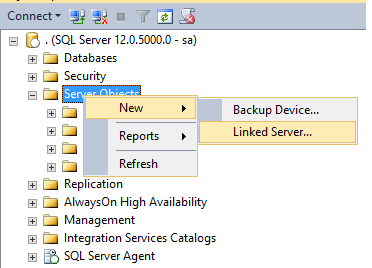
4) Press the right mouse button on the ""Server Objects"
Example:


5) Write the Linked Server Name: SQL02 in this example
6) Set the server type to SQL Server
7) In Security set the your security settings
In this example the Local login is "sa" and the "Impersonate" checkbox is active. Also the "For a login not defined in the list above, connection will:" option is set to "Be made using this security context", defining the Remote login and password.
Example:


8) On "Server Options" allow "RPC Out"
Example:


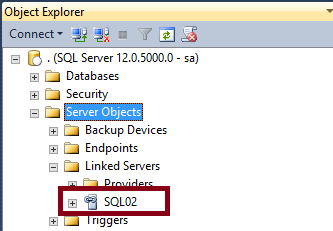
9) Press OK and if the everithing is correctly defined the linked server is configured


After configuring the linked server the job can be started on the SQL02 from the SQL01.

To test open a query window on SSMS in the SQL01 server and execute the SP to start the job:

EXEC [SQL02].[msdb].[dbo].[sp_start_job] @job_name = N'MyJob';

Where "MyJob" is the name of the job to start on SQL02

Note that the job is started, but the sp_start_job does not wait for the job "MyJob" to complete the execution.

05 January 2018

High CPU usage in Visual Studio 2017

Visual studio 2017 has a High CPU usage after using it for some time.

The issue is very annoying, since the work computer starts to get very slow and unresponsive.

I fixed my problem by performing the following steps:

  1. Close all the visual studio open instances
  2. Delete all the .suo files from the visual studio solutions folders
  3. Remove all the .vs hidden directories from the visual studio solutions folders

Use this solution with caution, so you only delete the referred files or folders.

19 June 2017

T-SQL: How to raise an error on a user defined function (udf)

A common programming task is to create a user-defined function. The function can perform some tasks and raise an error if some validation fails.
Let us try to raise an error
CREATE FUNCTION dbo.Division(@op1 INT, @op2 INT)
RETURNS INT
AS
BEGIN
    IF (@op2 = 0)
    BEGIN
    RAISERROR ('Division by zero.', 16, 1);
    END

    RETURN CAST(@op1 AS DECIMAL(18, 8)) /@op2
END

But this approach gives the following error:

Msg 443, Level 16, State 14, Procedure Division, Line 7 [Batch Start Line 0]
Invalid use of a side-effecting operator 'RAISERROR' within a function.

So another approach is needed.
Let us try the THROW statement
CREATE FUNCTION dbo.Division(@op1 INT, @op2 INT)
RETURNS INT
AS
BEGIN
    IF (@op2 = 0)
    BEGIN
    ;THROW 51000, 'Division by zero.',1;
    END

    RETURN CAST(@op1 AS DECIMAL(18, 8)) /@op2
END

But the result is the same as the RAISERROR:

Msg 443, Level 16, State 14, Procedure Division, Line 7 [Batch Start Line 0]
Invalid use of a side-effecting operator 'THROW' within a function.

Having tried all the known solutions to throw an exception in Sql Server, an alternative is needed.
Let's try a cast conversion error:
CREATE FUNCTION dbo.Division(@op1 INT, @op2 INT)
RETURNS DECIMAL(18, 8)
AS
BEGIN
    IF (@op2 = 0)
    BEGIN
    RETURN CAST('Division by zero.' AS INT);
    END

    RETURN CAST(@op1 AS DECIMAL(18, 8)) /  CAST(@op2 AS DECIMAL(18, 8))
END

The function is now created with success.
Let us see the result of calling the function with a division by zero:
SELECT dbo.Division(1, 0)

The following exception is thrown:

Msg 245, Level 16, State 1, Line 14
Conversion failed when converting the varchar value 'Division by zero.' to data type int.


It's not the ideal solution, but it allows us to generate a exception on a T-SQL function.

20 February 2017

How to backup all the user databases

The database administrator must backup periodically the databases on the Sql Servers.

The process is tedious and must be automated with a script to avoid forgetting any database.


The simple script can be scheduled on the Sql Server agent.
DECLARE @backupName VARCHAR(255) -- database backup name  
DECLARE @databaseName VARCHAR(255) -- database name  
DECLARE @path VARCHAR(256) -- Folder for the for backup files  
DECLARE @fileName VARCHAR(256) -- file name for generating the backup  
DECLARE @databaseExclusions TABLE (DatabaseName VARCHAR(255)) -- Databases to exclude the backup

-- Input parameters
SET @path = 'D:\Backup\2\'  
INSERT INTO @databaseExclusions (DatabaseName)
VALUES
('tempdb'),('master'),('model'),('msdb'),('AdventureWorks')


DECLARE database_cursor CURSOR FOR  
SELECT top 5 name
    FROM sys.databases 
    WHERE [state] <> 6 -- OFFLINE
    AND owner_sid != 1 -- User user database
    AND name NOT IN (SELECT DatabaseName FROM @databaseExclusions)
 
OPEN database_cursor   
FETCH NEXT FROM database_cursor INTO @databaseName   
 
WHILE @@FETCH_STATUS = 0   
BEGIN   
   SET @fileName = @path + @databaseName;  
   SET @backupName = @databaseName + '-Full Database Backup';

   BACKUP DATABASE @databaseName TO DISK = @fileName WITH NOFORMAT, INIT,  NAME = @backupName, SKIP, NOREWIND, NOUNLOAD, COMPRESSION,  STATS = 10
   
   FETCH NEXT FROM database_cursor INTO @databaseName   
END   

 
CLOSE database_cursor   
DEALLOCATE database_cursor

02 June 2016

How to convert a string to a byte array in C#

C# allow to easily convert a string to a byte array using the Encoding.ASCII.GetBytes function.
A sample usage is
string sample = "This is a simple string";
byte[] content = Encoding.ASCII.GetBytes(sample);

Note that this method only works if the string is with the ASCII format.

The framework supports other encodings (UTF8, Unicode, UTF32, ...) but a more generic method is needed.
The ideal solution if to don't need to worry about the encoding if the bytes don't need to be interpreted.
A use case for this solution is to transfer a file from a web server to a browser.
        static byte[] GetBytes(string value)
        {
            byte[] bytes = null;
            using (var memoryStream = new MemoryStream())
            {
                using (var streamWriter = new StreamWriter(memoryStream, Encoding.Default))
                {
                    streamWriter.Write(value);

                    streamWriter.Flush();
                    streamWriter.Close();

                    bytes = memoryStream.ToArray();
                }
            }

            return bytes;

        }


But this solution also uses the Encoding.Default for the StreamWriter.

The Enconding can also be performed as:
string sample = "This is a simple string";
byte[] content = Encoding.Default.GetBytes(sample);

Welcome the the encondig hell!!

01 June 2016

T-SQL: How to split a path name in the path and file name

A common task in T-SQL is how to split a path name in the path and file name.

The following code will do the task:

DECLARE @file VARCHAR(200) = 'c:\temp\data\log.txt'

SELECT REVERSE(LEFT(REVERSE(@file), CHARINDEX('\', REVERSE(@file), 1) - 1)) AS [FileName]

SELECT LEFT(@file, LEN(@file) - CHARINDEX('\', REVERSE(@file), 1) + 1) AS [Path]

07 April 2016

Error when creating a Database diagram: Database owner is invalid

After restoring a database, I got an error when creating a Database diagram. Like the following image:


The error informs that the database owner is invalid.

The solution is to change to database owner using the sp_changedbowner.

To change the database owner for the sa user:
EXEC sp_changedbowner 'sa'

04 April 2016

The mistery of the slow stored procedure in the web App and fast in SSMS

Sql Server has a lot of mysteries and hidden "features".

In the troubleshooting of a web application page response time, I got a timeout executing a Stored Procedure. The query took more than 30 seconds executing on the SQL Server profiler.

I captured the query and executed it in SQL Server Management Studio (SSMS), to start analyzing the query execution plan.
For my surprise it was super-fast when executed in SSMS.

After some research I found that the applications the use ADO.Net set the ARITHABORT to OFF and SSMS set it to ON.
The setting can be disable as shown the in following image.

This setting difference makes that the SSMS will not reuse the same cache entry that the ADO.Net application uses. SQL Server will compile the stored procedure and create a new execution plan.
There are also other possibilities like parameter sniffing to cause this difference on execution times.
In my case the parameters were the same, but what only changed was the ARITHABORT setting.

Having identified that the problem was with the Stored Procedure corrupted execution plan and it's cache, I simply forced a recompile of the stored procedure using the WITH RECOMPILE.
Example usage:

ALTER PROCEDURE myStoredProcedure
(
@id INT,
@date DATETIME
)
WITH RECOMPILE
AS


SQL Server recompiled the stored procedure, generated a new plan and the timeout disappeared.

26 February 2016

T-SQL: Converting rows to columns

A common task of a database developer is to convert rows to columns from a query result set.

T-SQL has the PIVOT that facilitates the process.

A simple example:

DECLARE @myValues TABLE (Quantity INT, Category VARCHAR(100))

INSERT INTO @myValues (Quantity, Category)
VALUES 
 (10, 'Fruits'),
 (200, 'Vegetables'),
 (40, 'Meats')


SELECT *
FROM @myValues

SELECT [Fruits], [Vegetables], [Meats]
FROM @myValues
PIVOT
(
  MAX(Quantity)
  FOR Category IN ([Fruits], [Vegetables], [Meats])
) Piv

17 November 2015

How to fix visual studio 2015 error "The package did not load correctly"

When a visual studio extension is installed, a error can occur that gives the following error:

The 'zebre' package did not load correctly.

The problem may have been caused by a configuration change or by the installation of another extension. You can get more information by examining the file 'C:\Users\[user name]\AppData\Roaming\Microsoft\VisualStudio\14.0\ActivityLog.xml'.

Restarting Visual Studio could help resolve this issue.
Continue to show this error message?


The error can cause intellisense not working or other erratic issues.

A possible fix is to uninstall the extension that is causing the error.

The issued can be fixed executing the following command as an administrator:

devenv.exe /setup

If the previous solution does not work, reset the visual studio preferences by issuing the command (Execute as an administrator):

devenv.exe /resetuserdata

02 October 2015

Dapper: Powerful micro object mapper for .Net

Introduction

Dapper.Net or Dapper is a simple and powerful micro object mapper for .Net, that eases the development of a Data Access Layer (DAL).
Dapper is in production used by Stack Overflow, helpdesk and other companies.
Performance is the major focus in Dapper. It is very fast and the execution time is near equal to a hand coded DAL using the SqlDataReader.
Dapper uses the POCO (Plain Old CLR Object) approach.

Setup

Dapper has several installation options:
1) Download from github
Dapper can be downloaded from the github
After the download the cs class files must be added to your project or class library.

2) Nuget package
Dapper is also available as a Nuget package that can be added to you Visual Studio Project references.

Helpers

Dapper extend the IDbConnection interface with three Helpers:
1) Execute a query and map the results to any strongly type
public static IEnumerable Query(this IDbConnection cnn, string sql, object param = null, SqlTransaction transaction = null, bool buffered = true)

2) Execute a query and map the results to a Dynamic type
public static IEnumerable Query (this IDbConnection cnn, string sql, object param = null, SqlTransaction transaction = null, bool buffered = true)

3) Execute a command that returns no results
public static int Execute(this IDbConnection cnn, string sql, object param = null, SqlTransaction transaction = null)

A simple example is to retrieve user information from a database.
First define the POCO class that represents the user. The names must be equal to the database table names.
public class User
{
     public int UserID { get; set; } 
     public string Name { get; set; }
}
To select a list of all the users:
using (SqlConnection connection = new SqlConnection(myConnectionString))
{
     connection.Open();
     List users = connection.Query("SELECT * FROM [User]").ToList();
     connection.Close();
}
Not that "myConnectionString" must be a connection string accepted by the SqlConnection.
Dapper also works with LINQ to return a list (ToList) or single objects (Single / SingleOrDefault)

Parameterized queries

The parameters of a query are passed as anonymous classes.
The anonymous classes must have the query parameter name and it's value.

Example:
To select a list of all the users that the name ends with "Doe":
using (SqlConnection connection = new SqlConnection(myConnectionString))
{
     connection.Open();
     List users = connection.Query("SELECT * FROM [User] WHERE Name LIKE @name", new {name = "%Doe'"}).ToList();
     connection.Close();
}
In this example the name will be matched with the parameter @name of the query.

Stored Procedures

Dapper has extensive support for stored procedures.

Example:
using (SqlConnection connection = new SqlConnection(myConnectionString))
{
     connection.Open();
     List users = connection.Query("UserSearch", 
                                               new {name = "%Doe"}, 
                                               commandType: CommandType.StoredProcedure).ToList();
     connection.Close();
}
In this example, the stored procedure has a parameter named "name" that will receive the value "%Doe".
The parameters can also be passed using the DynamicParameters class, but the anonymous class approach works fine and is more simple.

Table Value Parameters

Dapper supports Stored Procedures Table Value Parameters (TVP):
System.Data.DataTable countryDataTable = new System.Data.DataTable();
countryDataTable.Columns.Add("Id", typeof(long));

countryDataTable.Rows.Add(1);
countryDataTable.Rows.Add(2);

using (SqlConnection connection = new SqlConnection(myConnectionString))
{
     bool isValid = connection.Query(@"IsValid", 
                                      new {
                                             UserID = 674,
                                             countries = countryDataTable.AsTableValuedParameter("[dbo].[IdList]")
                                           },
                                           commandType: CommandType.StoredProcedure
                      ).Single();
}

Where IdList is the sql server table value type with the column Id of type INT
CREATE TYPE [dbo].[IdList] AS TABLE(
 [Id] [int] NULL
)

Multiple Result Sets

Dapper has support for multiple result sets in a single query.
In this case use the QueryMultiple extension method:
var sql = @" select * from Users where UserID = @id ";
sql += @" select * from Roles where UserID = @id"

using (var multi = connection.QueryMultiple(sql, new {id = myId }))
{
     var users = multi.Read<User>().Single();
     var roles = multi.Read<Role>().ToList();
} 

CRUD - Create, Read, Update and Delete


Dapper has no native support for Create, Read, Update e Delete (CRUD)
These operations must be manually developed in queries.

There are however third party extensions that easy the implementation of these operations.
One of those is SqlMapperExtensions the can be found on the dapper github on the Dapper.Contrib Folder.
The file must be added to your project or class library.
This extension uses the POCO (Plain Old CLR Object) approach, so you must create a class that has it's properties with the same name and corresponding data type with the database table.
Take some time to read the extension code and verify that it implements the code accordingly to your needs.

The SqlMapperExtension implements the following extension methods:

The entity identifier must have the attribute [Key] to identify it.
Example:
public class User
{
     [Key]
     public int UserID { get; set; } 
     public string Name { get; set; }
}

1) Get
Get returns a single entity by it's Id.
using (SqlConnection connection = new SqlConnection(myConnectionString))
{
     connection.Open();
     User user = connection.Get(200);
     connection.Close();
}

2) Insert
Inserts the entity and returns it's Id.

using (SqlConnection connection = new SqlConnection(myConnectionString))
{
     connection.Open();
     User user = new User();
     user.Name = "John Doe";

     connection.Insert(user);
     connection.Close();
}
3) Update
Updates the entity.

4) Delete
Delete the entity by it's Id.

5) DeleteAll
Deletes all the entities in the table with the same name as the POCO class.
The best documentation for this extension is at the Test cases

12 May 2015

Time testing: How to prevent time syncing

A common task when performing tests on data sets that vary over time is to advance the windows time.
The server or the workstation can however be part of a domain and the time is synced with it.
In this situation after the date/time is changed for the tests, the sync process will update them to the Domain Controllers value.
This will reset the date/time and the test environment is lost.

A question will then arise:
How to prevent time syncing with Domain Controllers?

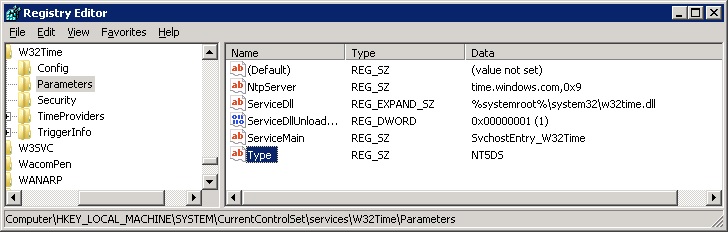
The best solution that works in my test environment, is to change the registry key Type (REG_SZ value) located at
HKEY_LOCAL_MACHINE\SYSTEM\CurrentControlSet\Services\W32Time\Parameters

The Type can have the following values:
Value Description
NoSync No Sync with Domain Controllers
Nt5DS Sync with Domain Controllers

Note that the Nt5DS value is my configuration. Keep your Type value in the registry to restore to it.

The value can be updated with the registry editor (regedit) or by the command line, executing the following command:

reg add HKEY_LOCAL_MACHINE\SYSTEM\CurrentControlSet\Services\W32Time\Parameters /v Type /d NoSync /f

Note that the value NoSync forces the time not being synced with the Domain Controllers. Change the value to you configuration to restore the time sync.

This solution is great, but be aware that if the server/workstation date/time gets out of sync with the Domain Controllers, authentication will fail and you can loose access to them.
While testing, keep the server/workstation logged-in so that you can keep the date/time in sync with the Domain Controllers.

To automated the process of setting the test ambient you can create a cmd file with:

reg add HKEY_LOCAL_MACHINE\SYSTEM\CurrentControlSet\Services\W32Time\Parameters /v Type /d NoSync /f
net start W32Time
sc config "W32Time" start= disabled
net stop W32Time
date 01-04-2090

In this example the date is set as 01-04-2090

To return to the previous environment:
reg add HKEY_LOCAL_MACHINE\SYSTEM\CurrentControlSet\Services\W32Time\Parameters /v Type /d Nt5DS /f
sc config "W32Time" start= auto
net start W32Time

You may also need to set the date, if you computer is not syncing the date with and time server.

03 March 2015

Fix: Property PopulationStatus is not available for FullTextCatalog

After restoring a database with full text search active, on Sql Server 2014, on a staging server I got the following error when opening the Full Text Catalog:

Property PopulationStatus is not available for FullTextCatalog '[SearchDB]'. This property may not exist for this object, or may not be retrievable due to insufficient access rights. (Microsoft.SqlServer.Smo)

The error is not self explanatory, but after some investigation I descovered that Full Text Search Service isn't installed on the staging server.

The easy way to validate if  Full Text Search is installed on a Sql Server is to execute the following T-SQL statement on Management studio:

SELECT FULLTEXTSERVICEPROPERTY ('IsFulltextInstalled')

28 November 2014

Management Studio: The type initializer for ‘PropertyMetadataProvider’ threw an exception

Sql Server Management Studio, gave me the following error after I rebooted my computer:
The type initializer for ‘PropertyMetadataProvider’ threw an exception


I installed the windows updates and started relating the problem to the updates.

After some research I found a interesting artice in Sql Blog about the problem that states that the DLL versions of the cumulative update 4 for SQL Server 2014 had bad DLL versions.

The temporary workaround is:
1) Close all instances of Management studio and visual studio
2) Open a administrator command prompt
3) Execute the following commands :

         (i) cd %WINDIR%\assembly\GAC_MSIL\Microsoft.SqlServer.Smo
         (ii) rmdir /Q /S 12.0.0.0__89845dcd8080cc91

4. Run the SQL Server 2014 setup
5. Select the Maintenance option
7. Press the Repair link
8. Pass all the per-requirement steps and click Repair button
9. Once the repair is finished launch Management studio and the error should be fixed

References:
Sql Blog

08 July 2014

SQL Server Table Value Constructor

The latest versions of Sql Server (SQL Server 2008 or above) implement the Table Value Constructor.

Definition

The Table Value Constructor defines a set of row value expressions to be added to a table.
It allows us to create tables of values and/or expressions.
The Table Value Constructor allows us to simplify the T-SQL syntax.

Syntax

The Table Value Constructor is defined as:
VALUES (<row value expression>),(<row value expression>), (<row value expression>), ...
The Table Value Constructor must start with the VALUE keyword and that it can have one or more row value expression.
The <row value expression> can have one of the following values:
1) NULL
2) DEFAULT. If there isn't a default defined for the column NULL is inserted.
3) A constant, variable or an expression. The expression cannot have the EXECUTE statement.
The expression only allows single scalar values. Sub-queries that return multiple columns are not supported.
An example of an invalid sub-query is:
SELECT ID, Name FROM [User]
Note that the values list can have a maximum of 1000 rows. The sql server error 10738 is thrown if the number of rows is greater than the 1000 rows limit.
To insert more row use the classic approaches like a multiple INSERT statements or a BULK INSERT.

Examples

1) Insert multiple rows
CREATE TABLE Product
(
Id INT IDENTITY(1,1) NOT NULL,
Name VARCHAR(1000)
)
INSERT INTO Product
VALUES ('John Doe'), ('Tim Burton'), ('Tom Thomas')

This example can be used to initialize table values.

2) SELECT using a derived table
SELECT x,y
FROM (VALUES (1, 'row 1'), (2, 'row 2'), (3, 'row 3')) AS myTable(x,y)

This example uses the Table Value Constructor as a derived table, to create a table named myTable with the columns x and y.

3) SELECT the maximum value between two variables
DECLARE @val1 MONEY = 20
DECLARE @val2 MONEY = 5

SELECT MAX(Val)
FROM (VALUES (@val1), (@val2)) AS MyTable(Val)

The query returns the value 20. This can be very useful to easily select the maximum value between two or more variables, since sql server doesn't have a built-in function to do this operation.

Table Value Constructor can also be used with the MERGE statement.

01 July 2014

SSAS: OLAP PivotTable Extensions

Excel Pivot tables are a reporting tool that makes it easy to extract information from data sets without the use of formulas.
Excel Pivot tables are great for browsing Analysis Services cubes, since they allow to easily move, pivot and analyze data using drag and drop to see the same data in a number of different ways
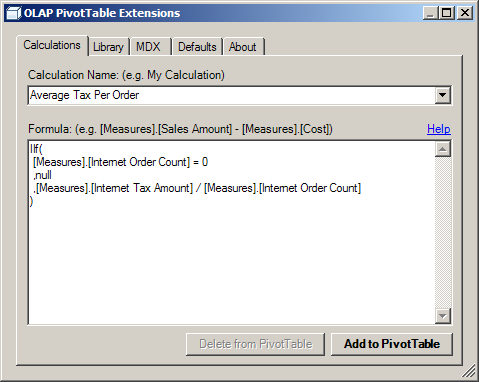
OLAP PivotTable Extensions add advanced features to the pivot tables.
OLAP PivotTable Extensions are an Excel add-in which extends the functionality of PivotTables on Analysis Services cubes.
It works with Excel 2007, Excel 2010, and Excel 2013.
The Excel API has certain PivotTable functionality which is not exposed in the user interface. OLAP PivotTable Extensions provides an interface for some of this functionality and it also adds some new features like searching cubes, configuring default settings, and filtering to a list in your clipboard.


For more information and to install the OLAP PivotTable Extensions go to the codeplex website:

http://olappivottableextend.codeplex.com

30 June 2014

Turn off Visual Studio 2013 Preview of files

Visual studio 2013 previews the file content when it is selected.
The feature can be very annoying and luckily it can be disabled.

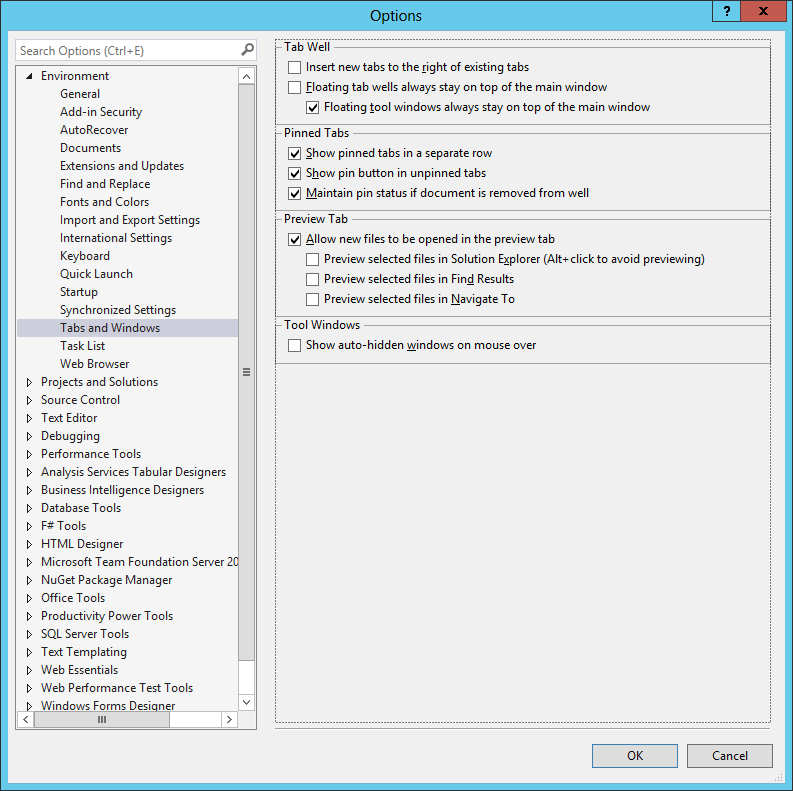
To disable the feature, in the visual studio menu, select Tools -> Options -> Environment -> Tabs
Uncheck all the Preview tab checkboxes.

06 June 2014

Fix SSDT error" Could not load type Microsoft.SqlServer.TransactSql.ScriptDom.OnOffStatisticsOption"

The SQL Server Data Tools for SQL Server 2014 (SSDT) are now available for Visual Studio 2012 and 2013.
The SQL Server Data Tools - Business Intelligence for Visual Studio 2013 (SSDT-BI) are also available.
I installed both and after a while the schema compare started failing with the error:

Error 6 Could not load type 'Microsoft.SqlServer.TransactSql.ScriptDom.OnOffStatisticsOption' from assembly 'Microsoft.SqlServer.TransactSql.ScriptDom, Version=12.0.0.0, Culture=neutral, PublicKeyToken=89845dcd8080cc91'

The solution that worked for me was to uninstall some components of SSDT and then repair the installation.
The detailed steps are:
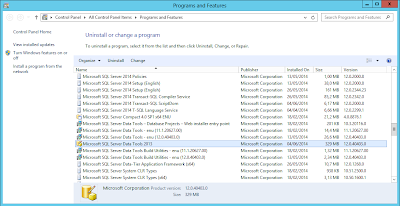
1) Open Control Panel and then Programs and Features
2) Uninstall the following items:
    Microsoft SQL Server 2014 Management Objects version 12.0.2299.1
    Microsoft SQL Server 2014 Management Objects (x64) version 12.0.2299.1
    Microsoft SQL Server 2014 Transact-SQL ScriptDom version 12.0.2299.1
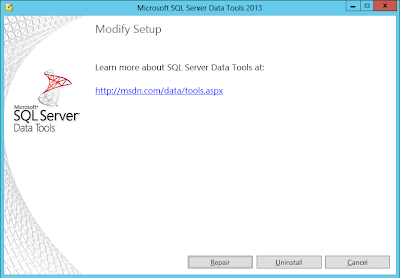
3) Select Microsoft SQL Server Data Tools 2013, right click to select Change

press the repair button


Note that this solution fixes the SSDT but may have side effect on the SSDT-BI.

02 June 2014

Undocumented sp_MSforeachdb: Iterate through each database

The stored procedure sp_MSforeachdb is used to iterate through each database that exists in SQL Server, including the system databases.

The stored procedure is undocumented and can be removed at any time, so use it carefully.

It is used to run a command over a set of databases in a server.
The stored procedure receives a parameter with the command to execute. The ? is used as a placeholder to identify the current database name listed by the stored procedure.

Some common scenarios where it can be used are:

1. Print all the database names, excluding the master,tempdb, model and msdb:
EXEC sp_msforeachdb 
"IF '?' NOT IN ('master','tempdb', 'model', 'msdb')   
BEGIN
        PRINT '?'
END"


2. Show the size of all the database
EXEC sp_MSforeachdb 'USE ?; EXEC sp_spaceused'


3. Check the integrity of all objects in the database
sp_MSforeachdb 'DBCC CHECKDB(?)' 


4. Retrieve database physical files information excluding the master,tempdb, model and msdb:
EXEC sp_msforeachdb 
'IF ''?'' NOT IN (''master'',''tempdb'', ''model'', ''msdb'')   
BEGIN
        SELECT name,physical_name,state,size FROM [?].sys.database_files
END'


5. Retrieve database physical files information excluding the master,tempdb, model and msdb to a table:

DECLARE @DbSize TABLE
    (
      mame NVARCHAR(50),
      physical_name NVARCHAR(500),
      size INT,
      growth INT,
   is_percent_growth BIT,
   type_desc NVARCHAR(10)
    )

INSERT  INTO @DbSize
EXEC sp_MSforeachdb 'IF ''?''  NOT IN (''master'', ''tempDB'',''model'',''msdb'')
BEGIN
       SELECT name,physical_name,size, growth, is_percent_growth, type_desc
       FROM ?.sys.database_files
END'

SELECT * FROM @DbSize